> ## Documentation Index
> Fetch the complete documentation index at: https://docs.juicebox.ai/llms.txt
> Use this file to discover all available pages before exploring further.
# Troubleshooting Login Issues and Password Reset
> Steps to regain access to your Juicebox account when you can't log in.
If you're having trouble logging into your Juicebox account, follow these steps to regain access.
## Reset your password
1. Visit the login page.
2. Click the **Forgot Password** link.
3. Enter your email address.
4. Follow the password reset instructions sent to your email.
5. Create a new strong password.
If you originally signed up using Google OAuth, you can use the password reset process to set up email/password authentication for your account. This allows you to log in with either method.
## Already logged in?
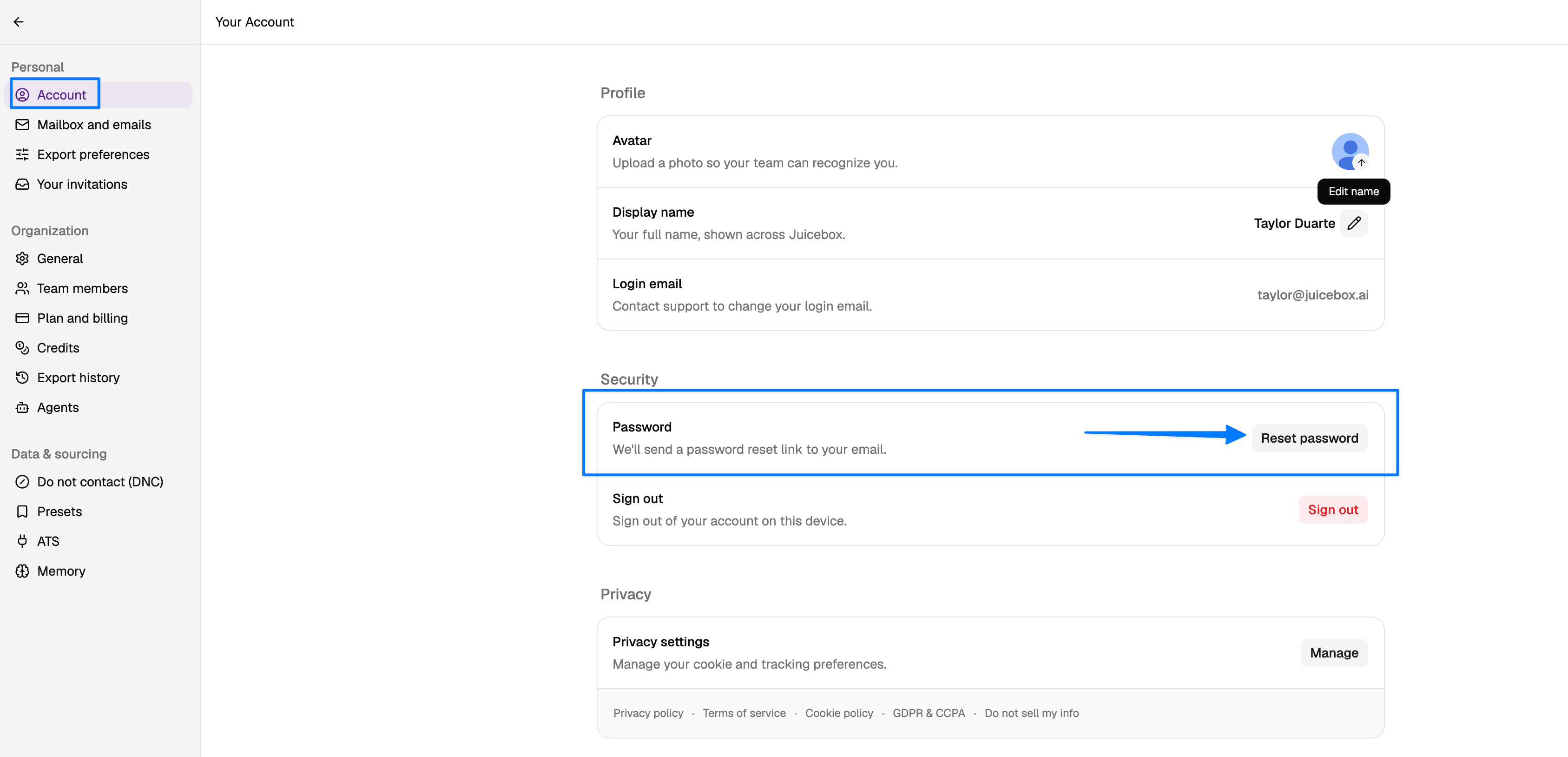
1. Head to **Account Settings**.
2. Go to **Account**.
3. Select **Reset password**.
4. The link will be sent to your email address.
 ## Still can't log in?
If a password reset doesn't resolve the issue, try these additional steps:
1. Clear your browser cache and cookies.
2. Try using an incognito or private browsing window to reset your password.
3. **Verify you're logged into the correct email account.** If you have multiple Juicebox accounts (for example, a free trial and a paid account, or personal and work emails), you may be logged into the wrong one:
* Check which email you're currently logged in with in [your account settings](https://app.juicebox.ai/account?tab=user).
* If you're logged into the wrong account, click on your name at the lower left side of the screen and select **Sign out**.
* Log back in using the correct email address and password.
* If needed, use the password reset steps above for the correct account.
4. Try using a different browser.
5. If you use a password manager, try entering credentials manually.
If you have multiple Juicebox accounts with different email addresses, your browser may automatically log you into the wrong account due to saved credentials. Using an incognito/private window can help bypass this issue.
If you continue to experience login issues after trying these steps, contact our support team at [support@juicebox.ai](mailto:support@juicebox.ai).
## Still can't log in?
If a password reset doesn't resolve the issue, try these additional steps:
1. Clear your browser cache and cookies.
2. Try using an incognito or private browsing window to reset your password.
3. **Verify you're logged into the correct email account.** If you have multiple Juicebox accounts (for example, a free trial and a paid account, or personal and work emails), you may be logged into the wrong one:
* Check which email you're currently logged in with in [your account settings](https://app.juicebox.ai/account?tab=user).
* If you're logged into the wrong account, click on your name at the lower left side of the screen and select **Sign out**.
* Log back in using the correct email address and password.
* If needed, use the password reset steps above for the correct account.
4. Try using a different browser.
5. If you use a password manager, try entering credentials manually.
If you have multiple Juicebox accounts with different email addresses, your browser may automatically log you into the wrong account due to saved credentials. Using an incognito/private window can help bypass this issue.
If you continue to experience login issues after trying these steps, contact our support team at [support@juicebox.ai](mailto:support@juicebox.ai).