> ## Documentation Index
> Fetch the complete documentation index at: https://docs.juicebox.ai/llms.txt
> Use this file to discover all available pages before exploring further.
# CEGID TalentSoft FrontOffice Integration Set-up
> Connect CEGID TalentSoft FrontOffice to Juicebox.
 ## About the integration
You can import jobs and export profiles with resumes. Application reads are limited to applications created through Kombo; confirm existing-candidate coverage with Juicebox Support.
## Before you start
This guide is for **FrontOffice**, not the TalentSoft Customer API. TalentSoft support must enable access for your organization.
Open **Integrations** in Juicebox, select **CEGID TalentSoft FrontOffice**, and choose **Activate**. Keep the connection window open while completing the steps below. If the integration is not visible, ask [Juicebox Support](mailto:support@juicebox.ai) to confirm access for your account.
The screenshots show vendor settings or the connection window provided by Kombo. Use the credentials, source labels, permissions, and URLs from your own connection; screenshot values are examples.
## Request FrontOffice access
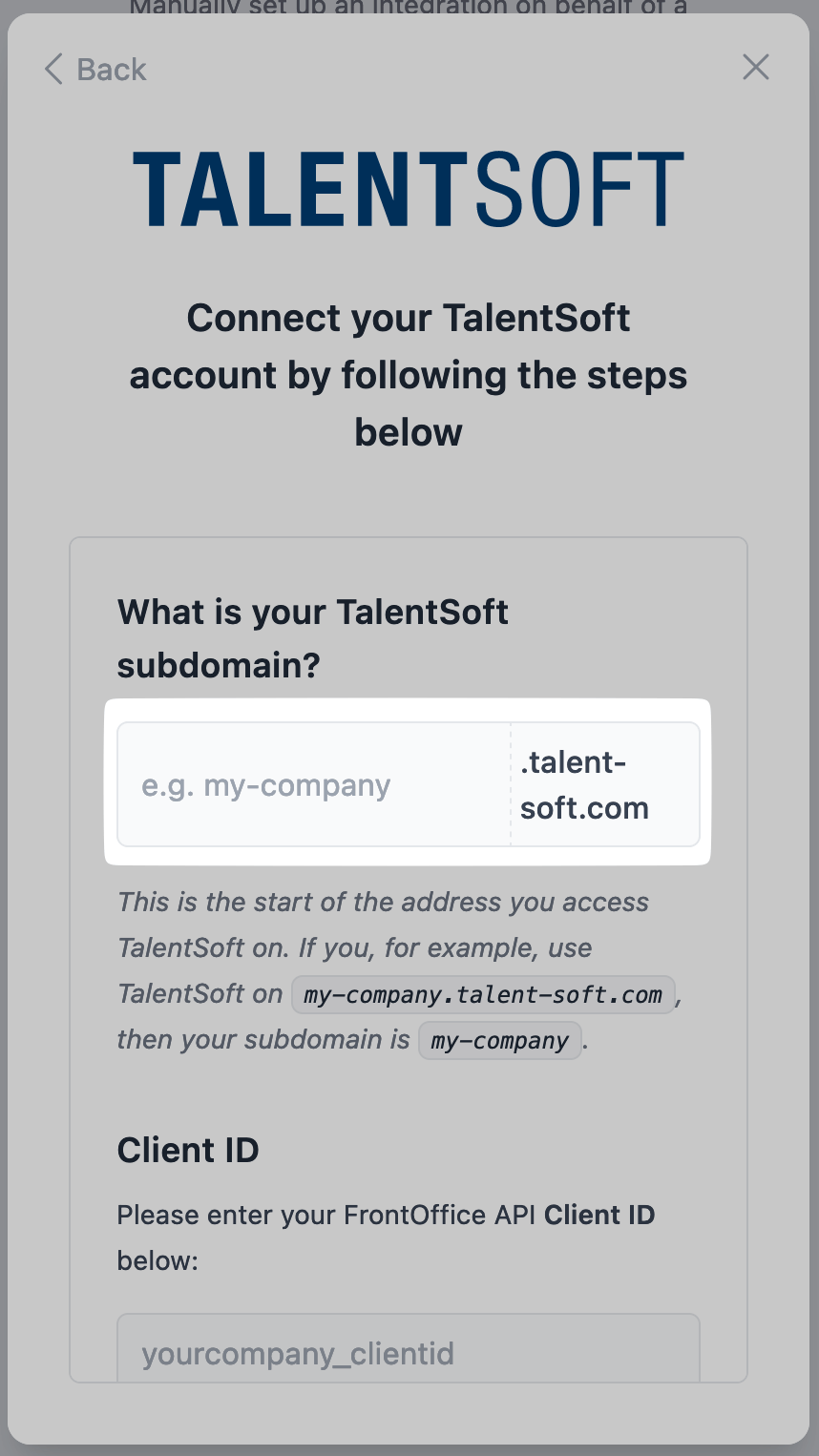
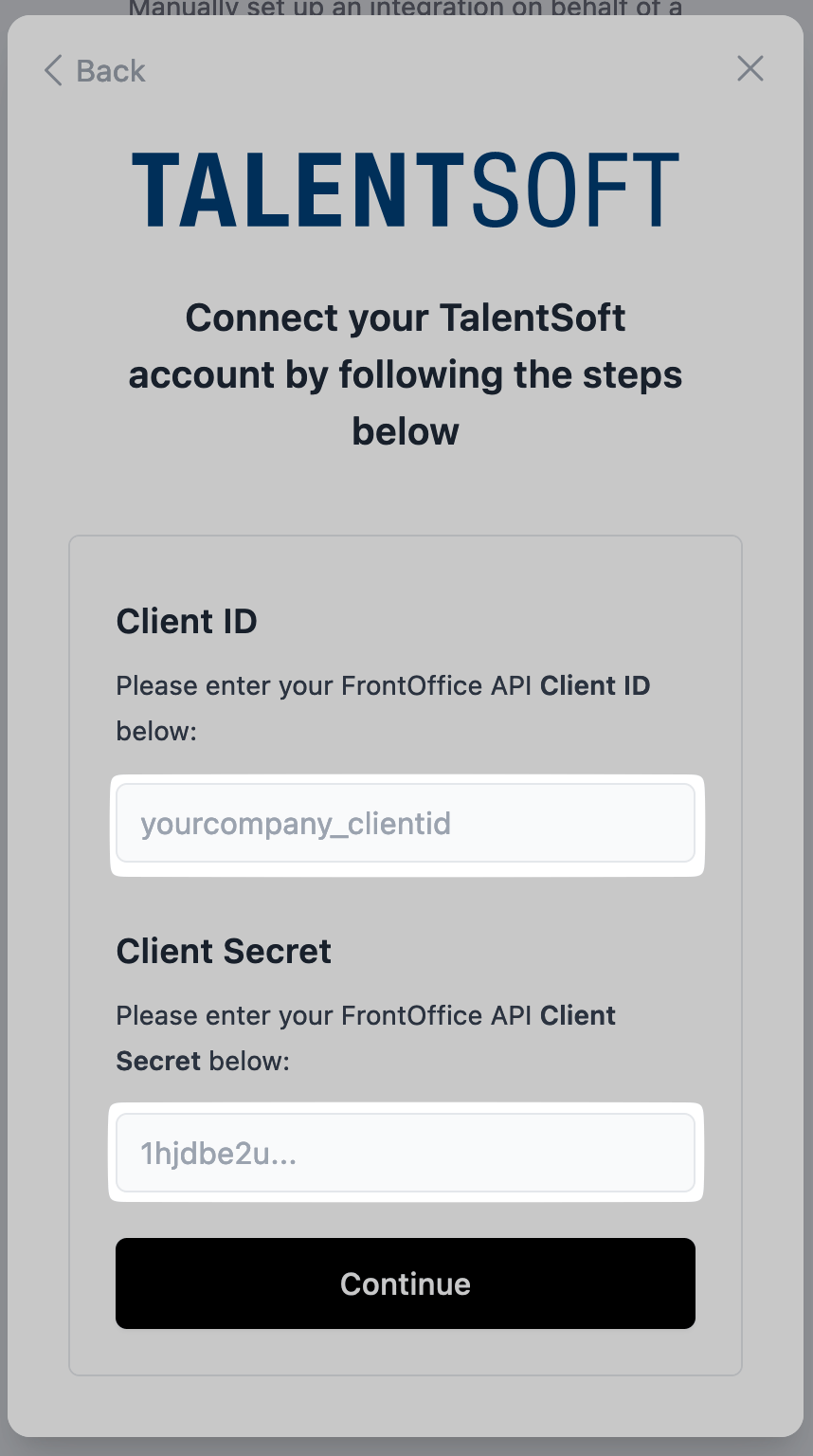
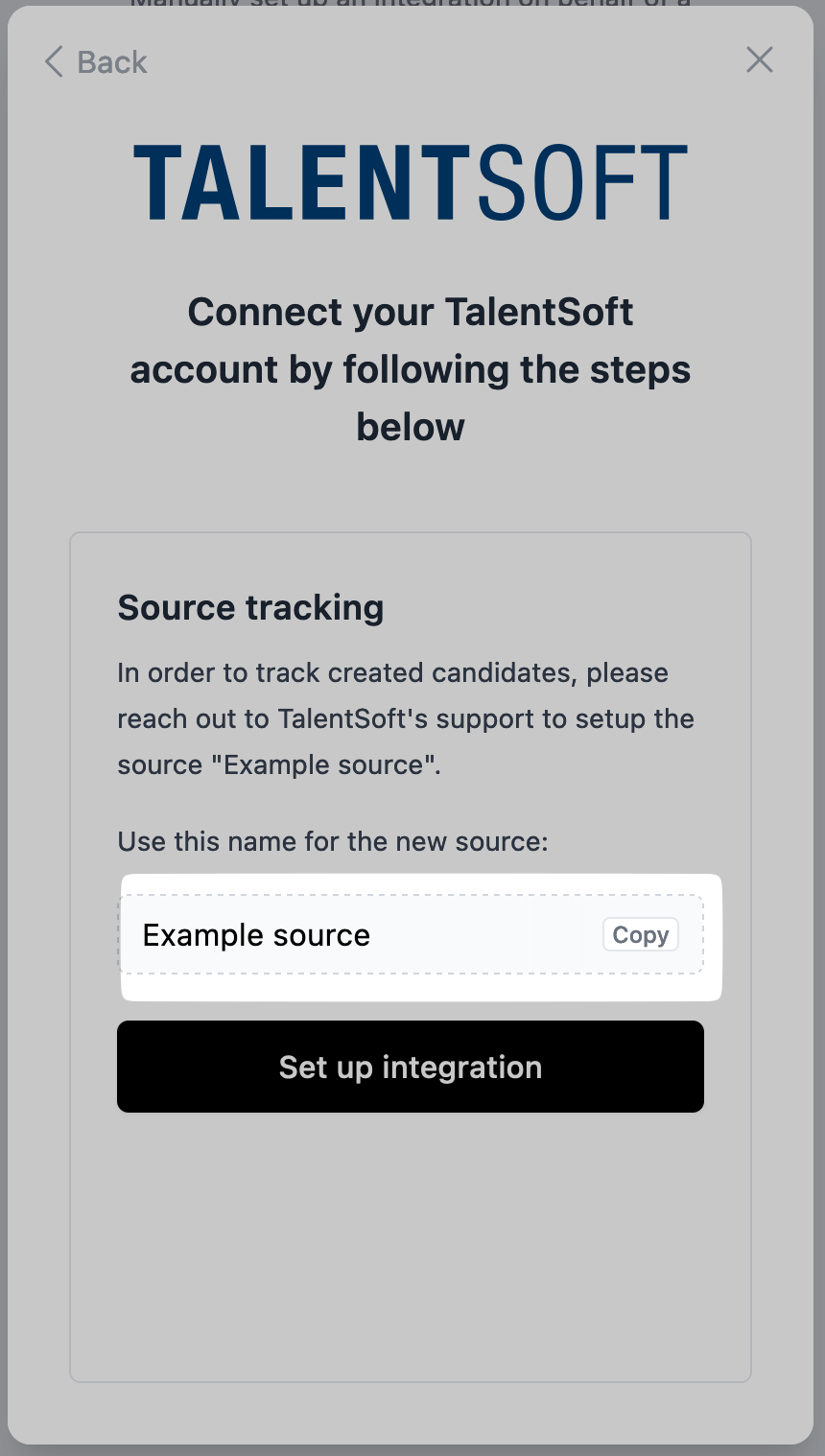
Ask TalentSoft support for the **Front-office URL**, **Front-office Client ID**, and **Front-office Client Secret**. Ask them to enable **application without account in web api**. If you want source attribution on exported applications, also ask support to register the source name supplied by your connection window.
## Enter the FrontOffice credentials
Enter the Front-office URL first, then the Client ID and Client Secret. Use the URL issued by TalentSoft; do not substitute a back-office URL.
## About the integration
You can import jobs and export profiles with resumes. Application reads are limited to applications created through Kombo; confirm existing-candidate coverage with Juicebox Support.
## Before you start
This guide is for **FrontOffice**, not the TalentSoft Customer API. TalentSoft support must enable access for your organization.
Open **Integrations** in Juicebox, select **CEGID TalentSoft FrontOffice**, and choose **Activate**. Keep the connection window open while completing the steps below. If the integration is not visible, ask [Juicebox Support](mailto:support@juicebox.ai) to confirm access for your account.
The screenshots show vendor settings or the connection window provided by Kombo. Use the credentials, source labels, permissions, and URLs from your own connection; screenshot values are examples.
## Request FrontOffice access
Ask TalentSoft support for the **Front-office URL**, **Front-office Client ID**, and **Front-office Client Secret**. Ask them to enable **application without account in web api**. If you want source attribution on exported applications, also ask support to register the source name supplied by your connection window.
## Enter the FrontOffice credentials
Enter the Front-office URL first, then the Client ID and Client Secret. Use the URL issued by TalentSoft; do not substitute a back-office URL.
 ## Finish source setup when requested
Enter the application source or origin provisioned by TalentSoft if the connection window requests it, then finish setup.
## Finish source setup when requested
Enter the application source or origin provisioned by TalentSoft if the connection window requests it, then finish setup.
 ## Confirm the integration
Finish the connection window and return to Juicebox. Confirm that the connection has completed, then allow the initial sync to populate your data.
* Check that the expected jobs appear in Juicebox.
* Export a test profile with a resume to a selected job, then verify the application in CEGID TalentSoft FrontOffice.
If validation fails, check the credentials, account or region, and permission list shown in the connection window. Contact Juicebox Support if the expected data is still missing.
## Using the integration
Start from an imported job on the [Projects](/projects) page to create a search linked to that job.
To send a profile to CEGID TalentSoft FrontOffice, follow the [export steps](/exports) and select the connected ATS and intended job.
## Support
For help, contact [support@juicebox.ai](mailto:support@juicebox.ai). For an overview of available workflows, see [ATS Integrations](/ats-integrations).
ATS-side setup reference: [Kombo’s CEGID TalentSoft FrontOffice connection guide](https://help.kombo.dev/hc/en-us/articles/19934224391313-Talentsoft-ATS-How-do-I-link-my-account).
## Confirm the integration
Finish the connection window and return to Juicebox. Confirm that the connection has completed, then allow the initial sync to populate your data.
* Check that the expected jobs appear in Juicebox.
* Export a test profile with a resume to a selected job, then verify the application in CEGID TalentSoft FrontOffice.
If validation fails, check the credentials, account or region, and permission list shown in the connection window. Contact Juicebox Support if the expected data is still missing.
## Using the integration
Start from an imported job on the [Projects](/projects) page to create a search linked to that job.
To send a profile to CEGID TalentSoft FrontOffice, follow the [export steps](/exports) and select the connected ATS and intended job.
## Support
For help, contact [support@juicebox.ai](mailto:support@juicebox.ai). For an overview of available workflows, see [ATS Integrations](/ats-integrations).
ATS-side setup reference: [Kombo’s CEGID TalentSoft FrontOffice connection guide](https://help.kombo.dev/hc/en-us/articles/19934224391313-Talentsoft-ATS-How-do-I-link-my-account).