> ## Documentation Index
> Fetch the complete documentation index at: https://docs.juicebox.ai/llms.txt
> Use this file to discover all available pages before exploring further.
# Welcome Kit: Automate your sourcing with Agents
This guide is part of a welcome kit series for Juicebox users. Check out the [previous guides on running a search](https://docs.juicebox.ai/welcome-kit-run-your-first-search) and [reaching out to candidates](https://docs.juicebox.ai/welcome-kit-reach-out-to-candidates) if you haven't used natural-language search, filters, criteria, shortlists, or sequences yet.
In the previous welcome guides, we showed you how to create a project, search for candidates using filters and criteria, shortlist top candidates, and create outreach sequences. If you need to review those topics, check out those guides first.
In this guide, we’ll set up AI Agents to source autonomously for us. You’ll learn how to:
* Set up an Agent for always-on, automated sourcing
* Calibrate the Agent to deliver high-quality leads
* Decide how you want it to deliver, approve, and reach out to leads
## What are agents and how can they help?
There’s a lot of talk in the market about “agents,” so let’s demystify what that means. AI agents are software capable of gaining context, making decisions, and taking multi-step actions to achieve a goal, with limited human oversight.
Juicebox Agents are essentially an extension of your recruiting team. Think of them like a world-class sourcing partner who is always working, proactively building your pipeline. Like a new member of your team, they need training and feedback to do their jobs well and understand the way you think about roles.
Agents don’t replace your human thought and judgment, so it’s important to know what to delegate to Agents vs. where it’s best for you to focus. Our most successful customers have a division of labor that looks like this:
**Agents:**
* Manage **top-of-funnel sourcing**
* Provide **proactively, deeply researched sourcing support**
* Work on **evergreen, always-open positions** where sourcing is continuous
* Work on **high-volume roles** where there’s a large search pool and consistent job titles and backgrounds across companies
* Use the ATS integration to rediscover **past ATS talent**, such as runner-up candidates from previous searches (available on Business plan only)
**Recruiters:**
* Focus on **candidate relationships and advising the business**
* Own the **strategy and decision making** for each role
* Work on **more strategic or specialized roles** with narrower search pools or more specialized candidates
Like a junior sourcing partner, an Agent will learn from your guidance and continuously search for relevant candidates to surface for you. But also like a junior sourcing partner, it needs your feedback to get better over time. We’ll show you how that works.
**Want more help?** Learn more about [Juicebox Agents](https://docs.juicebox.ai/juicebox-agents).
## Set up an agent
Running a search with a Juicebox Agent starts almost exactly like any other search. You still click **Create new project** for a new role and give it a title, like `Backend Engineer`.
*Just like other projects, use one project per role, so each Agent works on one role at a time.*
Up until now, you’ve probably been using the **Search** interface to describe the candidate. But now let’s switch the toggle over to **Agent**.
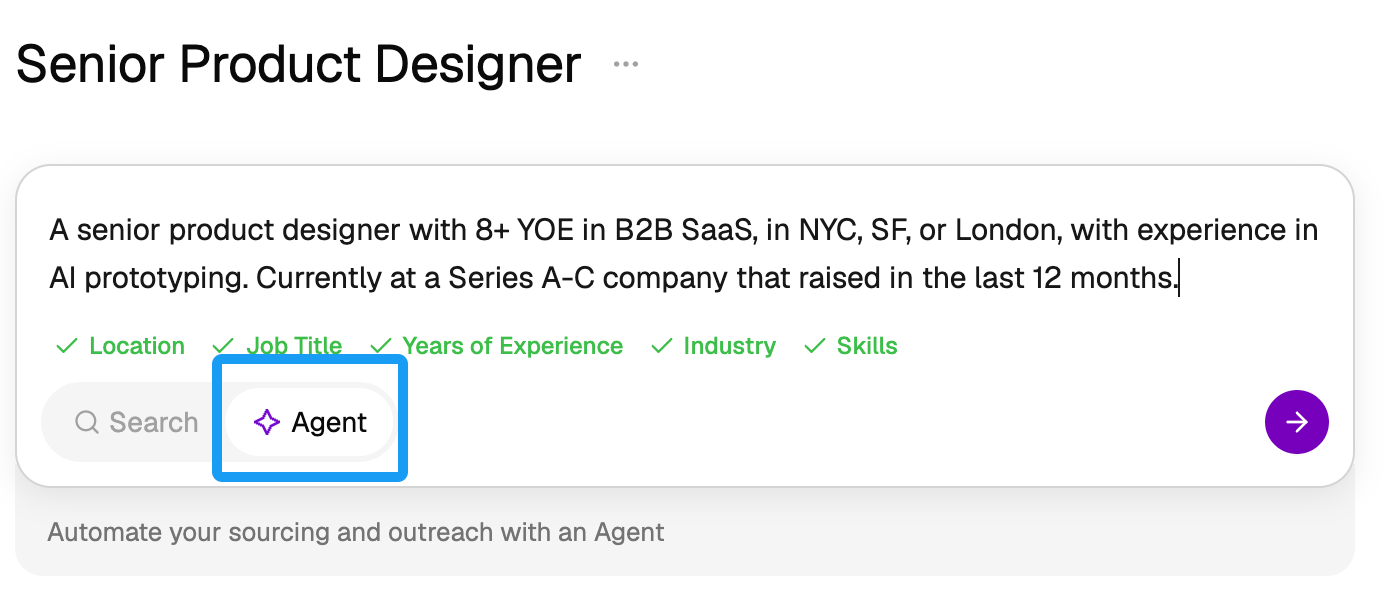 Similar to any search, you’ll describe the ideal candidate in natural language. Help the agent focus on the essentials by telling it the key skills or requirements for someone to excel in the role.
The Agent will work with any information you give it, even a quick natural-language blurb, but the best practice for faster, more accurate results is to give some context upfront to help the Agent learn. We recommend providing:
* The job description
* Notes on anything else that should be considered outside of the job description (for example, key points from the hiring manager kickoff)
* Optionally, 2-3 profiles of candidates you’ve actually hired for the role
*Agents can also search the web, so you can tell them something like* `Find people currently at a Series B company that raised in the last 12 months.`
Now, things will start to look different from a regular search. The Agent will reason as it searches, adjusting filters and criteria as it goes, or maybe even asking you for clarification. For example, it might see that the titles are too specific and broaden the search. You’ll still see all the filters and criteria and edit them manually if you need to.
Similar to any search, you’ll describe the ideal candidate in natural language. Help the agent focus on the essentials by telling it the key skills or requirements for someone to excel in the role.
The Agent will work with any information you give it, even a quick natural-language blurb, but the best practice for faster, more accurate results is to give some context upfront to help the Agent learn. We recommend providing:
* The job description
* Notes on anything else that should be considered outside of the job description (for example, key points from the hiring manager kickoff)
* Optionally, 2-3 profiles of candidates you’ve actually hired for the role
*Agents can also search the web, so you can tell them something like* `Find people currently at a Series B company that raised in the last 12 months.`
Now, things will start to look different from a regular search. The Agent will reason as it searches, adjusting filters and criteria as it goes, or maybe even asking you for clarification. For example, it might see that the titles are too specific and broaden the search. You’ll still see all the filters and criteria and edit them manually if you need to.
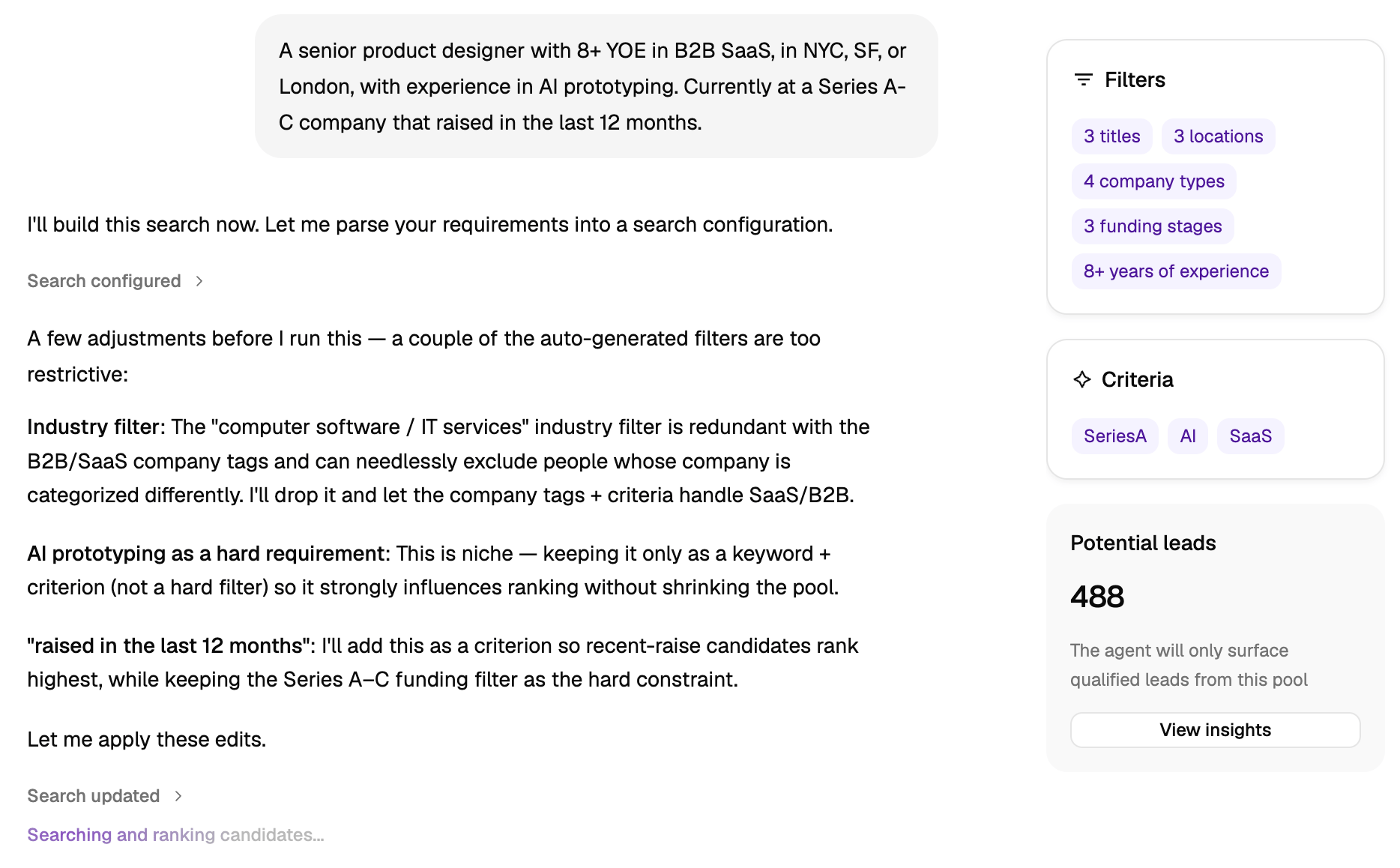 *If the number of potential leads is high during this initial search, don’t worry. That’s a good thing! This is not the number of candidates it will send you. It’s the size of the pool that it’s going to evaluate against your criteria.*
**Want more help?** Learn more about [setting up Agents](https://docs.juicebox.ai/juicebox-agents#setting-up-an-agent).
## Calibrate the Agent (one-time setup)
The first time you set up an Agent, you’ll need to calibrate it so that it learns your patterns of judgment and consistently sends you good candidates. Think of this like training a new teammate.
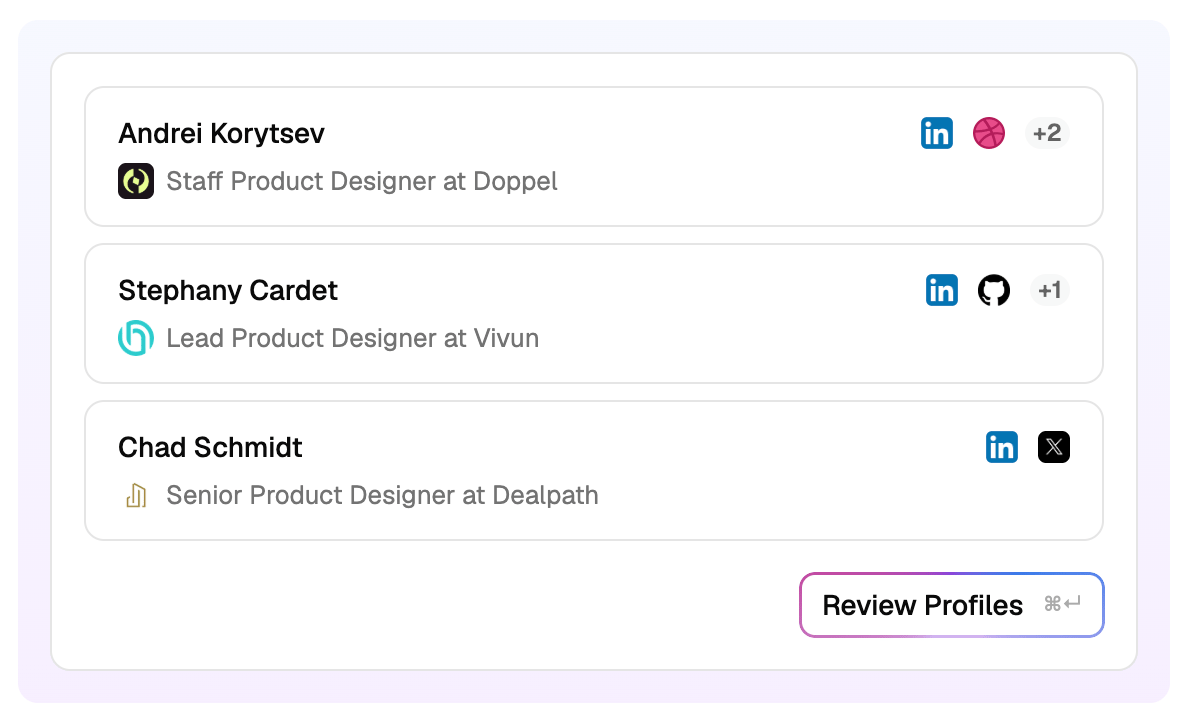
The Agent will give you three profiles to evaluate. Click **Review Profiles** to review each of them like you would any candidate, not looking for perfection but for match potential.
*If the number of potential leads is high during this initial search, don’t worry. That’s a good thing! This is not the number of candidates it will send you. It’s the size of the pool that it’s going to evaluate against your criteria.*
**Want more help?** Learn more about [setting up Agents](https://docs.juicebox.ai/juicebox-agents#setting-up-an-agent).
## Calibrate the Agent (one-time setup)
The first time you set up an Agent, you’ll need to calibrate it so that it learns your patterns of judgment and consistently sends you good candidates. Think of this like training a new teammate.
The Agent will give you three profiles to evaluate. Click **Review Profiles** to review each of them like you would any candidate, not looking for perfection but for match potential.
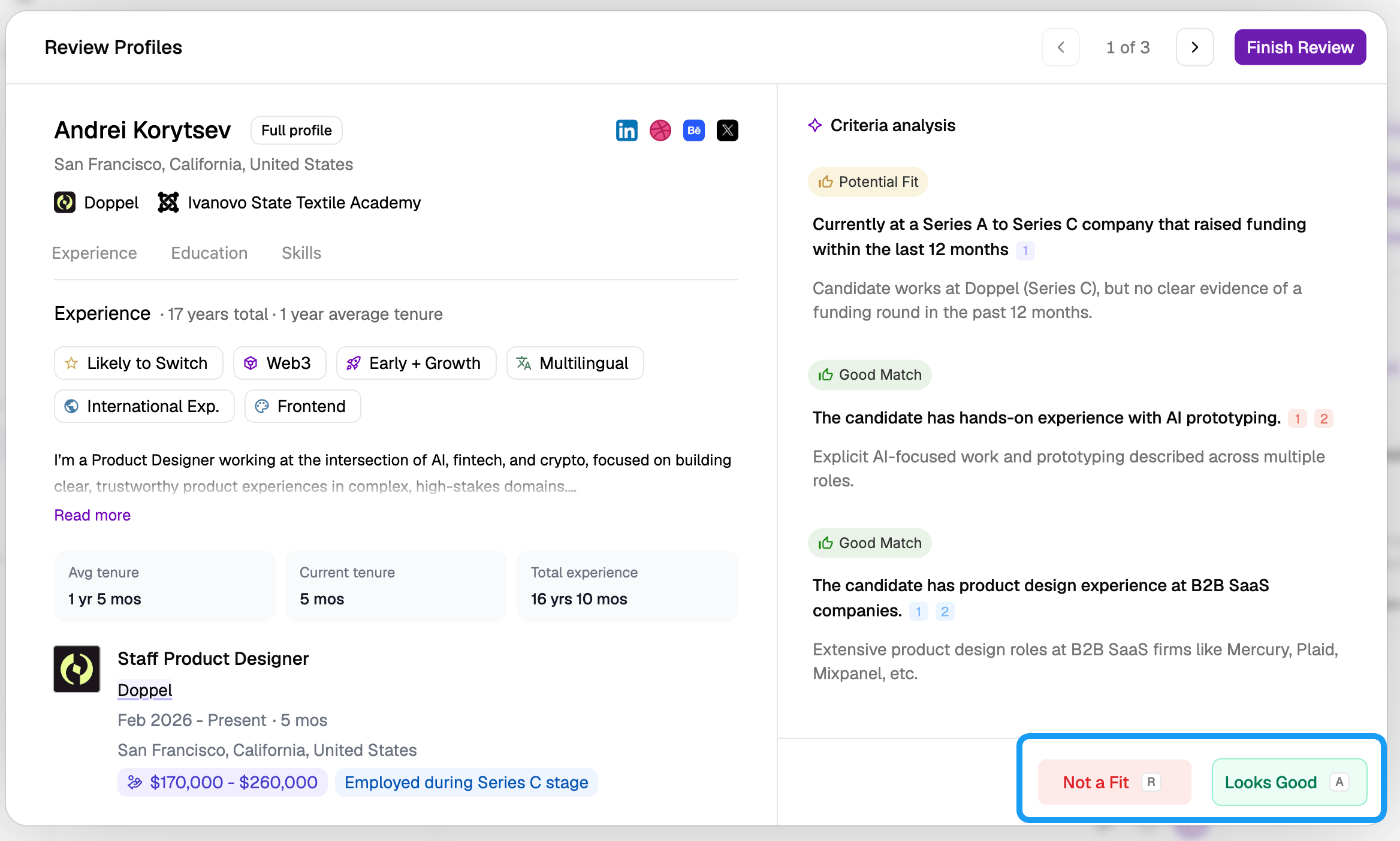
 * If you would take a call with this candidate, click **Looks Good** to approve them.
* If you wouldn’t take a call with this candidate, click **Not a Fit** to reject them.
* If you would take a call with this candidate, click **Looks Good** to approve them.
* If you wouldn’t take a call with this candidate, click **Not a Fit** to reject them.
 Always provide feedback when Juicebox asks **What’s wrong with this profile?** Be specific with your feedback, similar to how you’d train a new sourcer on your team to learn what you’re looking for. For example:
* `Right skills but wrong company stage. We're looking for hypergrowth experience, not enterprise.`
* `Job hopping pattern, three roles under 2 years, doesn't match our retention bar.`
* `Avoid candidates who worked at Company X.`
You can also provide “yes, but…” feedback when you approve candidates, such as:
* `Strong technical background but I'd prefer customer-facing experience`
* `Background is in internal L&D but I'd prefer someone who worked in Customer Success`
* `5 YoE is a maybe, I'd look for candidates with more experience`
The Agent is learning from all this feedback and getting better at pattern-matching, so *more feedback is always better.*
Now here’s the most important part: calibration isn’t finished until you select **Looks Good** for a set of three candidates in a row. If you select **Not a Fit**, it will keep calibrating until you’re more confident in the candidates it’s finding.
The Agent will keep learning as you accept or reject more candidates down the line, but at this point, the initial calibration is complete. You won’t have to do this again unless you want to re-calibrate it later.
**Want more help?** Learn more about [setting up and calibrating Agents](https://docs.juicebox.ai/juicebox-agents#setting-up-an-agent).
## Decide on settings
After you’ve calibrated the Agent, it will ask you to make three quick decisions:
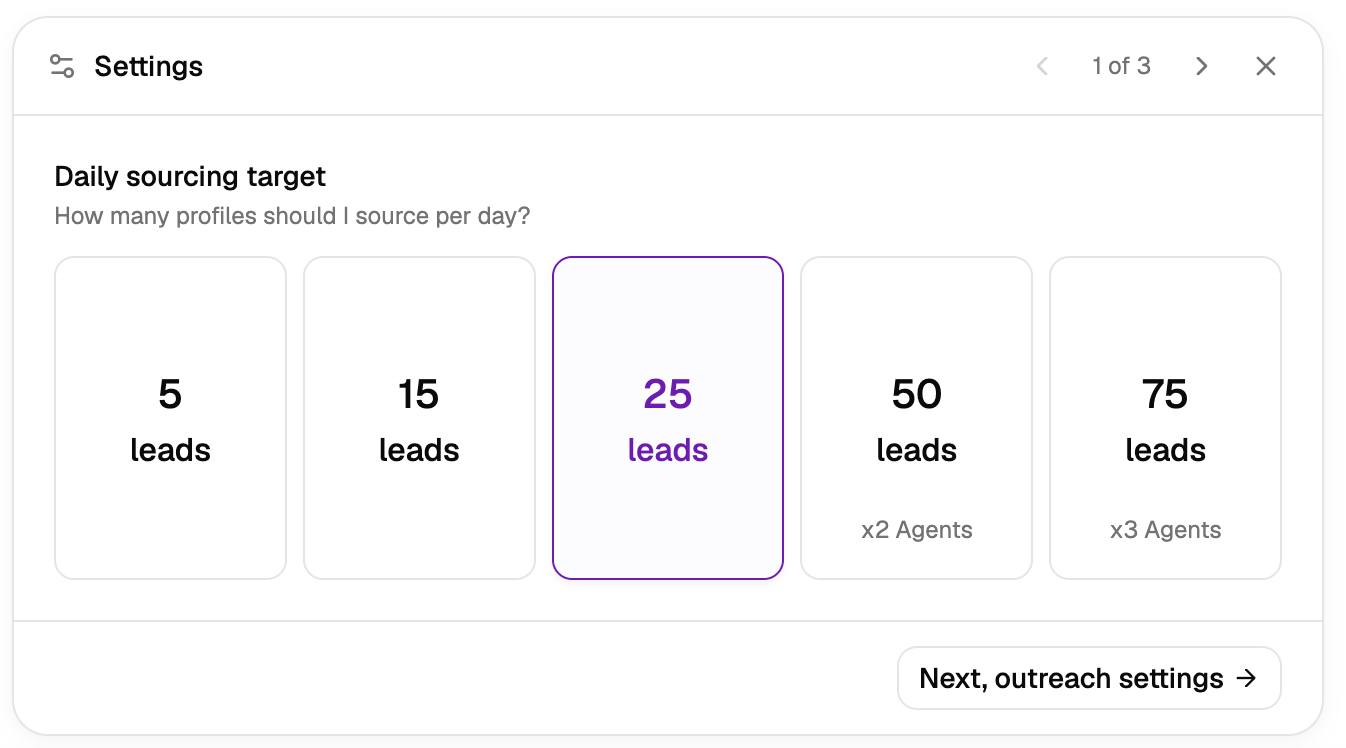
**Volume:** How many net-new leads per day should it send? To decide, think about what number you have time to review every day, while also building a healthy pipeline for the role.
* Our recommendation: If in doubt, start with 25 so you have a good initial pipeline.
* Note: 50 or more candidates per day will use multiple agent seats.
Always provide feedback when Juicebox asks **What’s wrong with this profile?** Be specific with your feedback, similar to how you’d train a new sourcer on your team to learn what you’re looking for. For example:
* `Right skills but wrong company stage. We're looking for hypergrowth experience, not enterprise.`
* `Job hopping pattern, three roles under 2 years, doesn't match our retention bar.`
* `Avoid candidates who worked at Company X.`
You can also provide “yes, but…” feedback when you approve candidates, such as:
* `Strong technical background but I'd prefer customer-facing experience`
* `Background is in internal L&D but I'd prefer someone who worked in Customer Success`
* `5 YoE is a maybe, I'd look for candidates with more experience`
The Agent is learning from all this feedback and getting better at pattern-matching, so *more feedback is always better.*
Now here’s the most important part: calibration isn’t finished until you select **Looks Good** for a set of three candidates in a row. If you select **Not a Fit**, it will keep calibrating until you’re more confident in the candidates it’s finding.
The Agent will keep learning as you accept or reject more candidates down the line, but at this point, the initial calibration is complete. You won’t have to do this again unless you want to re-calibrate it later.
**Want more help?** Learn more about [setting up and calibrating Agents](https://docs.juicebox.ai/juicebox-agents#setting-up-an-agent).
## Decide on settings
After you’ve calibrated the Agent, it will ask you to make three quick decisions:
**Volume:** How many net-new leads per day should it send? To decide, think about what number you have time to review every day, while also building a healthy pipeline for the role.
* Our recommendation: If in doubt, start with 25 so you have a good initial pipeline.
* Note: 50 or more candidates per day will use multiple agent seats.
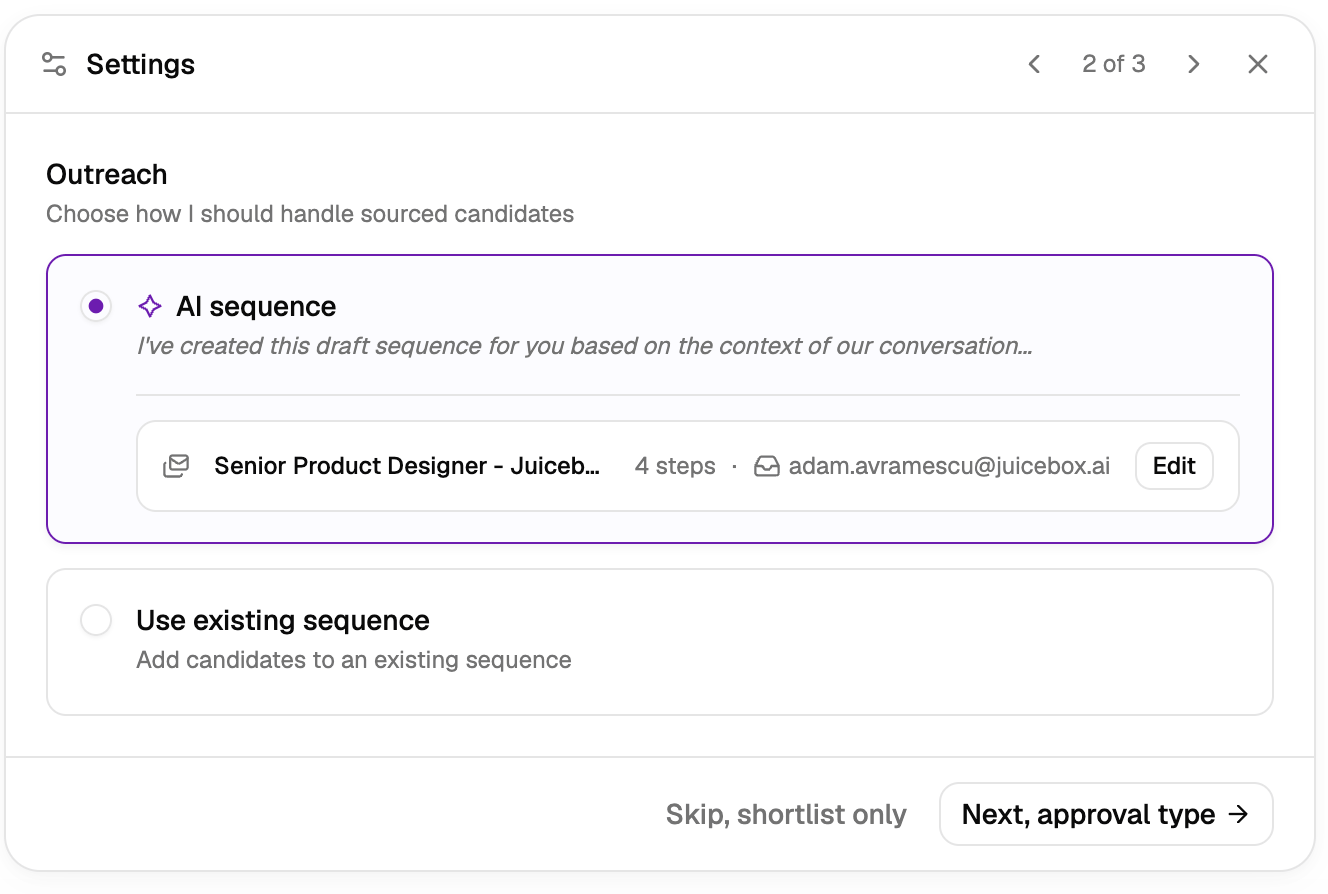
 **Outreach handling:** The Agent can auto-build a sequence based on the context from the chat or use an existing sequence. Or skip this step if you want the Agent to shortlist candidates without doing any outreach.
* Our recommendation: During your initial chat with the AI, give it real outreach examples and selling points to build an AI sequence, then edit it to reflect how you’d reach out to a candidate.
* Note: Choosing **AI sequence** will use AI to draft a sequence, but you can still edit it yourself. The Agent won’t autonomously send communications or sequences that you haven’t defined here, so you still have control.
**Outreach handling:** The Agent can auto-build a sequence based on the context from the chat or use an existing sequence. Or skip this step if you want the Agent to shortlist candidates without doing any outreach.
* Our recommendation: During your initial chat with the AI, give it real outreach examples and selling points to build an AI sequence, then edit it to reflect how you’d reach out to a candidate.
* Note: Choosing **AI sequence** will use AI to draft a sequence, but you can still edit it yourself. The Agent won’t autonomously send communications or sequences that you haven’t defined here, so you still have control.
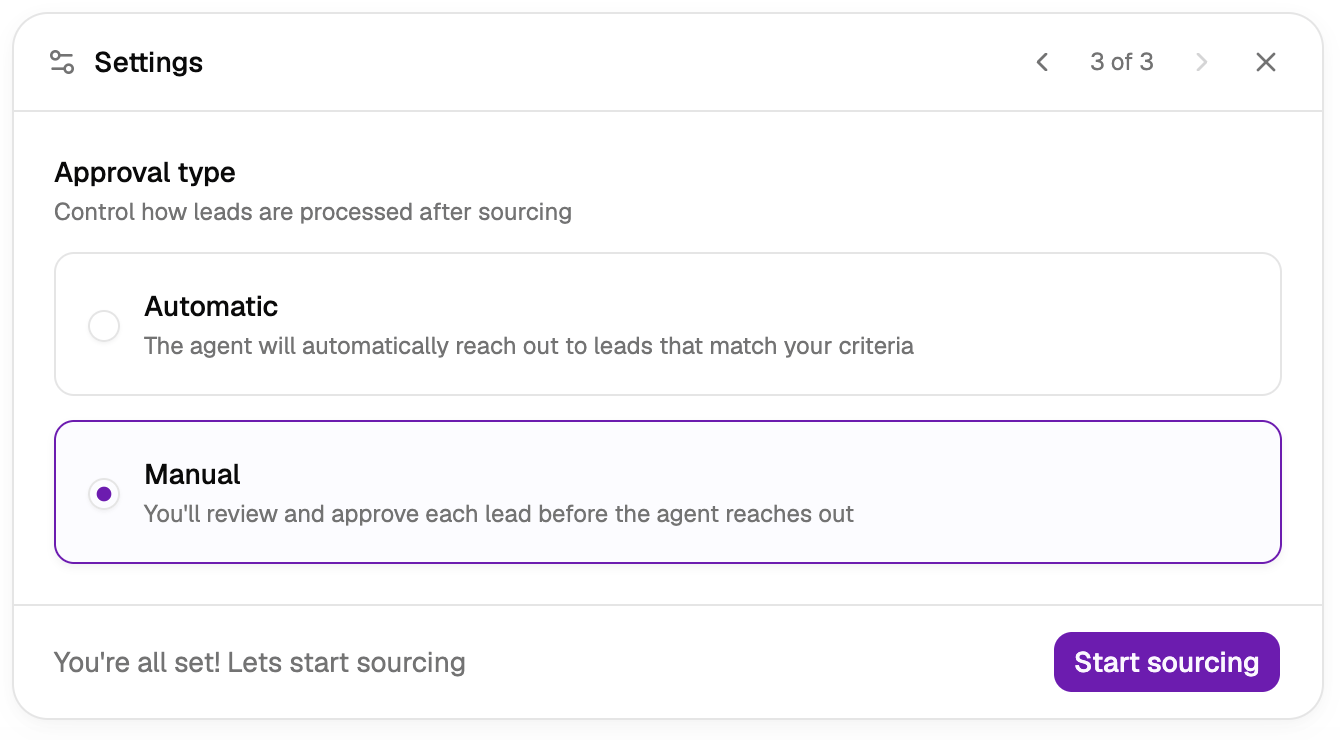
 **Approval type:** Choose **Manual** if you want the Agent to send you a list each day to review and approve. Choose **Automatic** if you want it to approve and reach out on its own.
* Our recommendation: Start with **Manual** for the first few days of a search. Our most successful customers do this for roughly three days or until they’re approving about 75% of candidates.
* Note: If you choose **Manual**, you’re responsible for reviewing leads to keep the Agent running. If leads sit unreviewed for four days, the Agent will auto-pause so you’re not overwhelmed with leads. Make sure to either **review leads at least every three days** in Manual mode, or set the Agent to **Automatic** to avoid this issue.
**Approval type:** Choose **Manual** if you want the Agent to send you a list each day to review and approve. Choose **Automatic** if you want it to approve and reach out on its own.
* Our recommendation: Start with **Manual** for the first few days of a search. Our most successful customers do this for roughly three days or until they’re approving about 75% of candidates.
* Note: If you choose **Manual**, you’re responsible for reviewing leads to keep the Agent running. If leads sit unreviewed for four days, the Agent will auto-pause so you’re not overwhelmed with leads. Make sure to either **review leads at least every three days** in Manual mode, or set the Agent to **Automatic** to avoid this issue.
 Once you’ve made these decisions, click **Start sourcing**, and 5-10 minutes later you’ll have your first batch of leads!
## Refine over time
Once the agent is running, it sources on a schedule: around 9:00am, your local time, every day.
* If you set outreach and approval to automatic, it’s now running automatically. Sit back and relax.
* If you skipped the outreach step, you’ll need to go to your shortlist to manually send sequences.
* If you set approval type to **Manual**, you’ll need to review and approve candidates on a regular basis. Do this from within the Agent by clicking **Review Leads**.
*Depending on the search, the Agent may eventually run **out of leads**. That’s because there’s a finite number of relevant candidates for your search, and an Agent won’t compromise the quality bar after that.*
As you work with Agents over time, the role requirements may shift, or you may want to broaden the search. Click **Calibrate** to chat with the Agent again and re-calibrate the role over time.
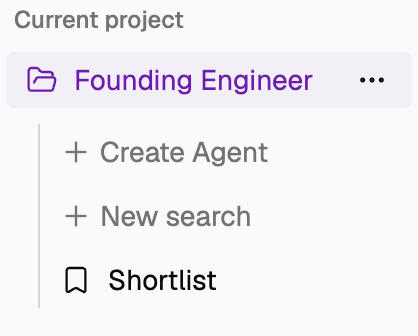
You may even want to create Agents for existing projects that started with manual searches. That’s as easy as creating a new search from the left sidebar. Just click **Create Agent** to add one to an existing project.
Once you’ve made these decisions, click **Start sourcing**, and 5-10 minutes later you’ll have your first batch of leads!
## Refine over time
Once the agent is running, it sources on a schedule: around 9:00am, your local time, every day.
* If you set outreach and approval to automatic, it’s now running automatically. Sit back and relax.
* If you skipped the outreach step, you’ll need to go to your shortlist to manually send sequences.
* If you set approval type to **Manual**, you’ll need to review and approve candidates on a regular basis. Do this from within the Agent by clicking **Review Leads**.
*Depending on the search, the Agent may eventually run **out of leads**. That’s because there’s a finite number of relevant candidates for your search, and an Agent won’t compromise the quality bar after that.*
As you work with Agents over time, the role requirements may shift, or you may want to broaden the search. Click **Calibrate** to chat with the Agent again and re-calibrate the role over time.
You may even want to create Agents for existing projects that started with manual searches. That’s as easy as creating a new search from the left sidebar. Just click **Create Agent** to add one to an existing project.
 **Want more help?** Learn more about [reviewing leads](https://docs.juicebox.ai/juicebox-agents#reviewing-leads) and [recalibrating Agents](https://docs.juicebox.ai/juicebox-agents#recalibrating-an-agent).
## What’s next?
Congratulations! By following this guide, you:
* Set up an Agent for always-on, automated sourcing
* Calibrated the Agent to deliver high-quality leads
* Decided how you want it to deliver, approve, and reach out to leads
* Resolved issues when the Agent pauses or runs out of leads
**Want more help?** Learn more about [reviewing leads](https://docs.juicebox.ai/juicebox-agents#reviewing-leads) and [recalibrating Agents](https://docs.juicebox.ai/juicebox-agents#recalibrating-an-agent).
## What’s next?
Congratulations! By following this guide, you:
* Set up an Agent for always-on, automated sourcing
* Calibrated the Agent to deliver high-quality leads
* Decided how you want it to deliver, approve, and reach out to leads
* Resolved issues when the Agent pauses or runs out of leads