


About the integration
Connect Haufe Umantis to Juicebox to import jobs and start searches from their job descriptions. You can also export profiles with resumes to a selected job. Existing candidates can be identified in Juicebox and used for rediscovery, subject to the access granted to the connection.Before you start
This guide is for the legacy Haufe Umantis connector. New customers should use Abacus Umantis. Have an Umantis administrator available for API approval. Open Integrations in Juicebox, select Haufe Umantis, and choose Activate. Keep the connection window open while completing the steps below. If the integration is not visible, ask Juicebox Support to confirm access for your account.The screenshots show vendor settings or the connection window provided by Kombo. Use the credentials, source labels, permissions, and URLs from your own connection; screenshot values are examples.
Submit your subdomain
Copy the part of your Umantis address before.umantis.com, enter it in the connection window, and continue. The legacy flow may pause while the integration request is processed; wait for Juicebox Support to confirm it is ready before attempting approval.

Find the subdomain for your legacy Umantis instance.
Approve API access
In Umantis, open Settings > API. Find the pending Partner API account, select Accept, and confirm on the next screen. Return to Juicebox to complete the connection.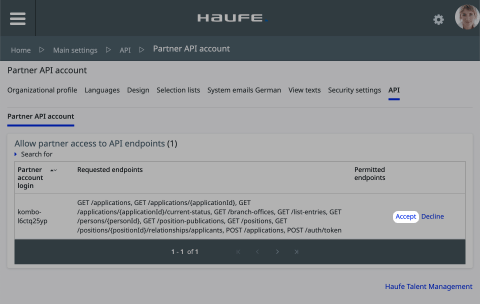
Accept the pending partner API request.
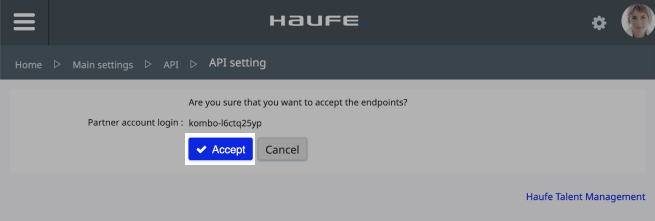
Confirm the API authorization.
Configure the source if requested
Under Main settings > Selection lists, edit How did you hear about us?. Choose Actions > Add selection value, enter the source label supplied by your connection window in each language, select the requested parent category, and save.Confirm the integration
Finish the connection window and return to Juicebox. Confirm that the connection has completed, then allow the initial sync to populate your data.- Check that the expected jobs appear in Juicebox.
- Find a known candidate and confirm that the information available matches your configured access.
- Export a test profile with a resume to a selected job, then verify the application in Haufe Umantis.